Latest updates

Changelog

Search across all your expenses.

New Feature
Search across all your expenses.

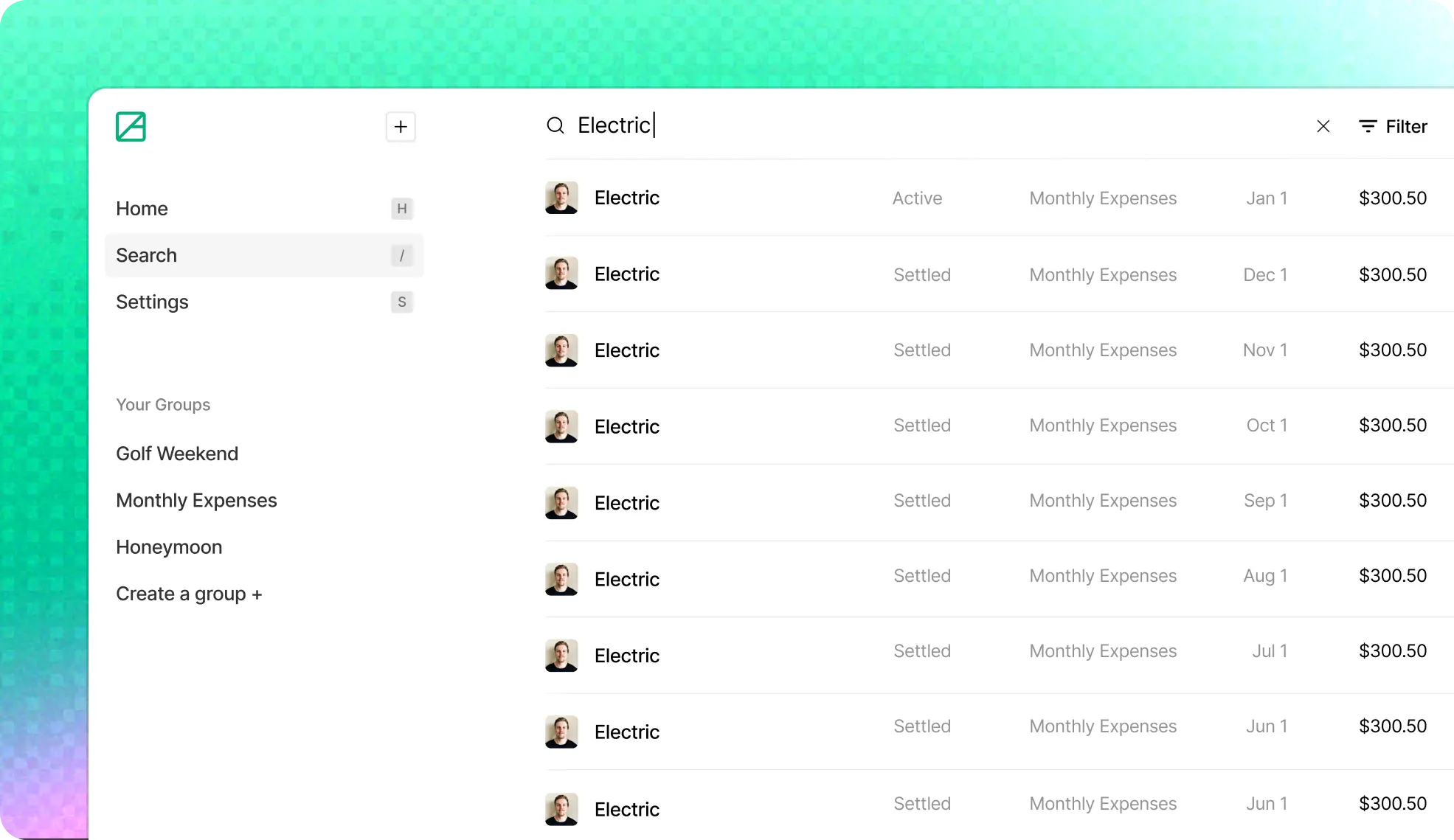
Instantly find any expense across all your groups. Filter by status, group, who paid, or date range.

Find what you're looking for in seconds. The new global search lets you look up any expense by its description, group name, or who paid, all from one place.

What's new

  • Search expenses by description, group name, or member name
  • Filter results by status, group, paid by, or date range
  • Click any result to view the expense details
  • Keyboard navigation with arrow keys to browse results
  • Press / from anywhere in the app to jump to search
  • Press Escape to clear your search

Filters

Narrow down results with combinable filters:

  • Status: Show only active or settled expenses
  • Group: Filter to specific groups
  • Paid by: Filter by who paid
  • Date range: Last 7 days, 30 days, 90 days, this year, or all time

Active filters appear as dismissable chips below the search bar so you always know what's applied.

Keyboard-first

Search is built for speed. Press / to open search, type your query, arrow down into results, and press Enter to open an expense.

Got feedback? We'd love to hear it.
Recurring expenses just landed.

New Feature
Recurring expenses just landed.

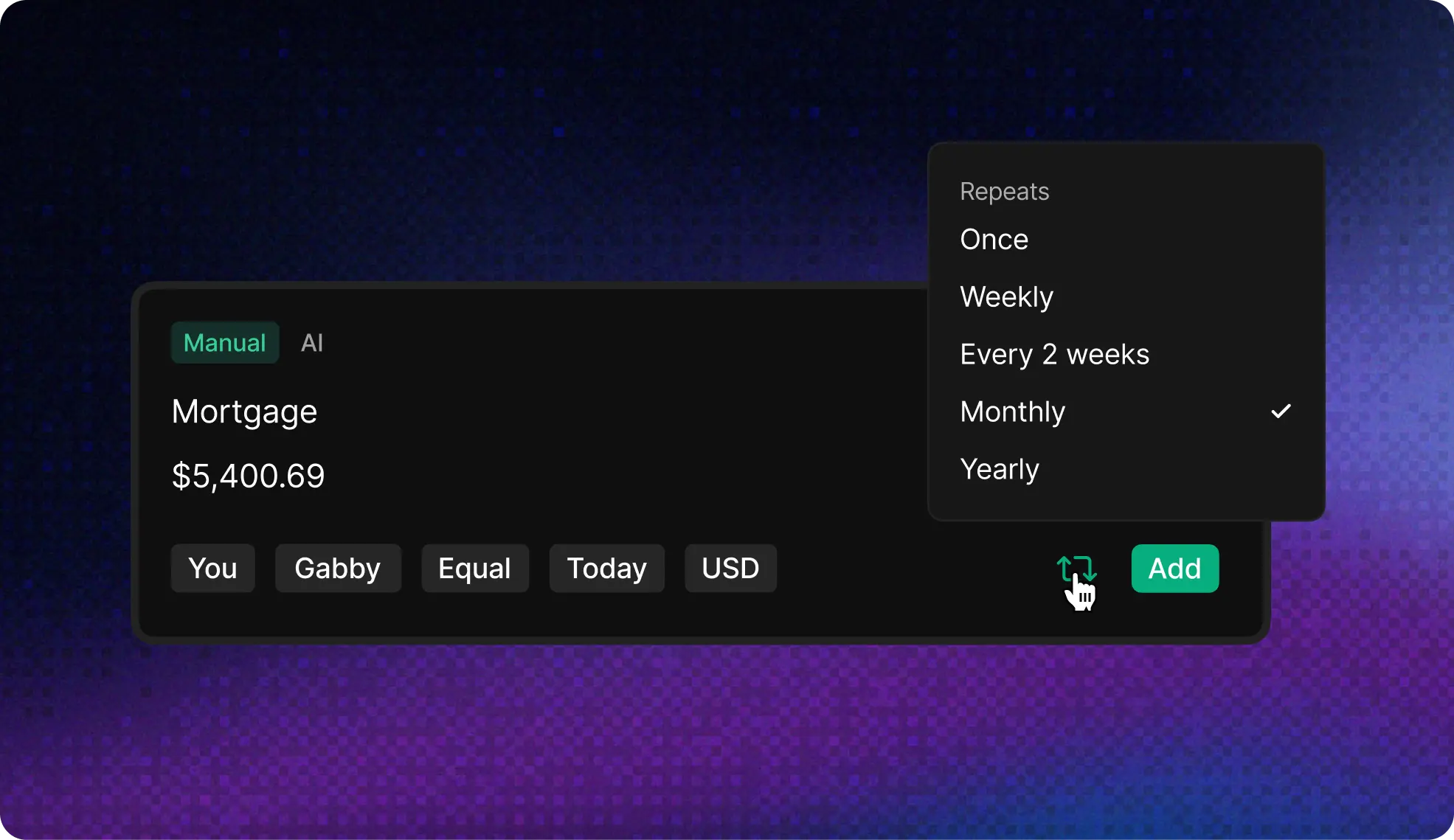
Set it and forget it. Create recurring expenses for rent, subscriptions, utilities, or any regular payment. AllSquare handles the rest.

Never forget a recurring expense again. Whether it's monthly rent, a weekly coffee run with your roommate, or an annual subscription, AllSquare now automatically creates expenses on your schedule.

What's new

  • Create recurring expenses with weekly, bi-weekly, monthly, or yearly frequencies
  • Expenses are automatically generated on the scheduled date
  • Edit or delete recurring expense templates any time
  • View all recurring expenses in a dedicated tab
  • Full support for all split types (equal, percentage, exact amounts)
  • Multi-currency support for recurring expenses

AI-powered entry

Say something like:

  • "Rent $1500 monthly split with Alex"
  • "Gym membership $50 every two weeks paid by me"
  • "Netflix $15.99 yearly split equally"

AllSquare's AI understands recurrence patterns and creates the right schedule automatically.

Real-time sync

Like everything in AllSquare, recurring expenses sync instantly across all your devices. Create a template on your phone, and your roommates will see it on their laptops right away.

Recurring expenses is free for now but will become a paid feature in the future. Got feedback? We'd love to hear it.

Multi-currency support is here.

New Feature

Track expenses in USD, CAD, EUR, or GBP. AllSquare automatically converts everything so your balances stay accurate, no matter which currencies your group uses.

Whether you're splitting a trip across borders or just have friends who prefer different currencies, AllSquare now handles it seamlessly.

What's new

  • Create expenses in USD, CAD, EUR, or GBP
  • Automatic exchange rate conversion using live rates
  • View balances converted to your preferred currency
  • Set a default currency for each group
  • AI expense entry detects currency from your description

Setting your preferences

  • Your preferred currency: Set your default currency in account settings
  • Group default: When creating a group, you can set the default currency for new expenses
  • Per-expense override: You can always change the currency when adding an individual expense

This was one of our most requested features. Thanks to everyone who asked for it. We hope it makes AllSquare even more useful for your international adventures.

AllSquare is now in open beta.

Launch
Announcement

We're excited to welcome our first users to AllSquare, the smarter, faster, more collaborative way to split expenses with friends, roommates, travel partners, and teams.

This is just the beginning. During the open beta, we're focused on refining the core experience and collecting feedback from early users.

What you can use today

Sign up now and get access to all core features:

  • Real-time updates
  • Sync across devices
  • AI-powered prompt-based expense entry
  • Keyboard shortcuts
  • Flexible splits
  • Private groups
  • Smart defaults
  • Light and dark mode
  • Activity history

Currently, you can create up to 3 groups, each with up to 4 members. You can also join as many groups as you're invited to. There are no limits on how many expenses you can add and how frequently you can add them.

If you need increased limits during the beta, just reach out. We're happy to bump them for active testers.

Features coming in the paid version

We're building even more for the upcoming subscription plan:

  • Increased group and member limits
  • Recurring expenses
  • AI-powered expense categorization
  • Currency conversion
  • Receipt photo parsing
  • Comprehensive search across expenses and groups

We'd love your feedback

Have ideas, questions, or bugs to report? Reach out any time: support@allsquare.app

Thanks for being here and helping us shape what AllSquare becomes.

Split smarter.
Settle faster.

Get started
Changelog | AllSquare